
Managing OAuth Apps
OAuth apps let you connect third-party applications to Reputic using the OAuth 2.1 authorization flow. The app acts on behalf of a Reputic user, requesting only the permissions it needs.
Note: OAuth apps are for building integrations that other users authorize. If you need API access for your own scripts or automations, use personal API tokens instead. See Getting Started with the API.
Prerequisites
- Active Reputic account
- A redirect URI for your application (e.g.
https://yourapp.com/oauth/callback)
OAuth Apps Section
Open the Profile page and scroll to the OAuth Apps section.
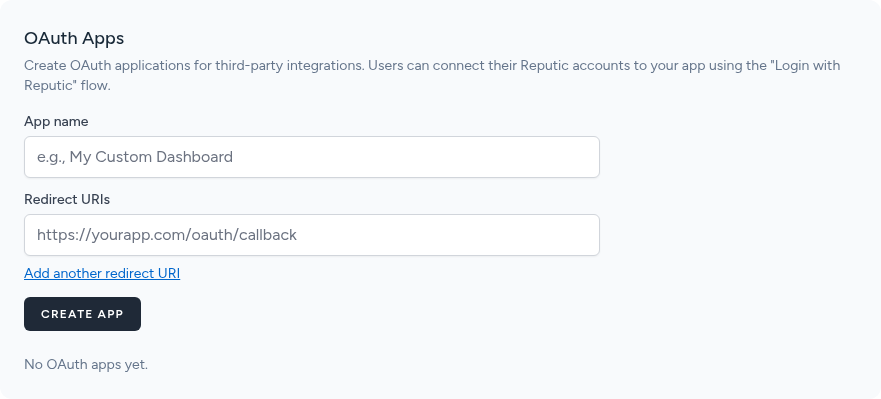
The table lists all apps you have registered with their Client ID, creation date, and management actions.
Creating an OAuth App
- Click Create OAuth App
- Enter a descriptive Name for your app (visible to users during authorization)
- Enter one or more Redirect URIs, one per line
- Click Save
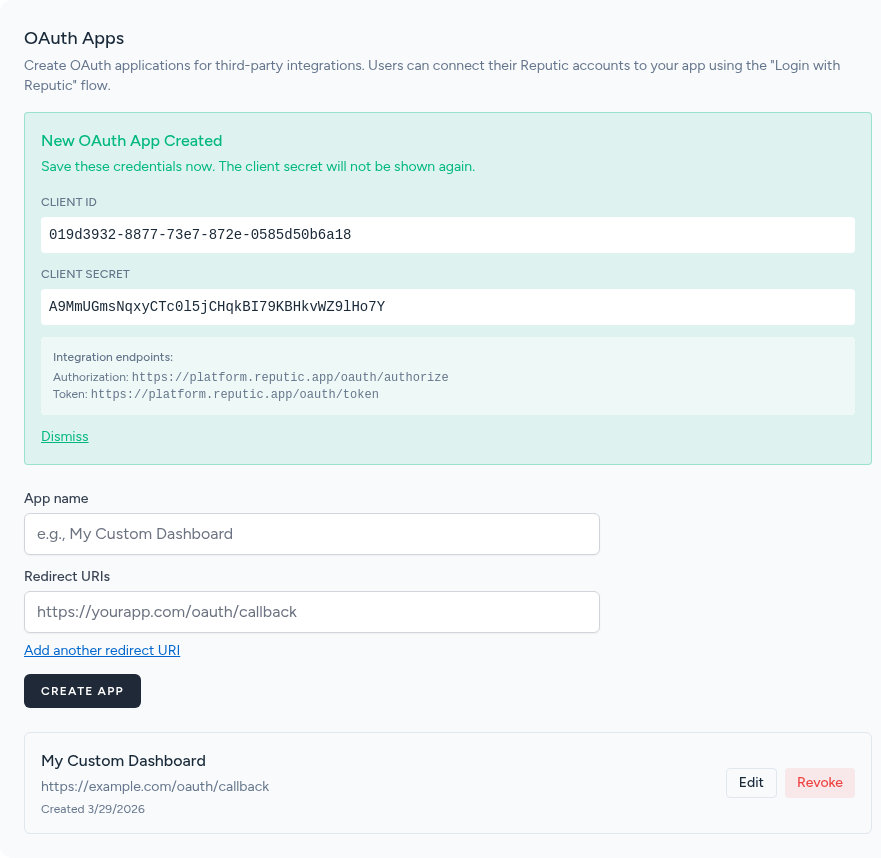
After saving, Reputic generates a Client ID and Client Secret.
Important: Copy the Client Secret immediately. It is only shown once and cannot be retrieved later. If you lose it, you must generate a new secret.
Store the Client Secret securely, such as in an environment variable or a secrets manager. Never commit it to source control.
Authorization Flow
Your app follows the standard OAuth 2.1 authorization code flow:
-
Redirect the user to the Reputic authorization endpoint with your app's Client ID, requested scopes, and a redirect URI:
https://app.reputic.app/oauth/authorize ?client_id=YOUR_CLIENT_ID &redirect_uri=https://yourapp.com/oauth/callback &response_type=code &scope=reviews:read+dashboard:read &state=RANDOM_STATE_VALUE -
User approves the requested permissions on the Reputic authorization screen.
-
Reputic redirects back to your redirect URI with an authorization code:
https://yourapp.com/oauth/callback?code=AUTH_CODE&state=RANDOM_STATE_VALUEVerify the
stateparameter matches the one you sent to prevent CSRF attacks. -
Exchange the code for a token by making a POST request from your server:
curl -X POST https://app.reputic.app/oauth/token \
  -H "Content-Type: application/x-www-form-urlencoded" \
  -d "grant_type=authorization_code" \
  -d "client_id=YOUR_CLIENT_ID" \
  -d "client_secret=YOUR_CLIENT_SECRET" \
  -d "redirect_uri=https://yourapp.com/oauth/callback" \
  -d "code=AUTH_CODE"
The response includes an
access_tokenand arefresh_token. -
Use the access token in the
Authorizationheader for all API requests:Authorization: Bearer ACCESS_TOKEN
Available Scopes
Request only the scopes your app genuinely needs. Users see the full list of requested permissions during authorization.
| Scope | Description |
|---|---|
reviews:read |
Read reviews and review metadata |
reviews:write |
Create and update reviews |
providers:read |
Read connected review source configuration |
providers:write |
Add and update review sources |
dashboard:read |
Read dashboard statistics and summaries |
insights:read |
Read AI-generated insights and sentiment data |
widgets:read |
Read review widget configuration and embed code |
reports:read |
Read and download generated reports |
benchmarking:read |
Read competitor benchmarking data |
settings:read |
Read account settings |
settings:write |
Update account settings |
subscription:read |
Read subscription plan and billing status |
profile:read |
Read profile information |
mcp:use |
Access the MCP server for AI assistant integrations |
Managing Apps
From the OAuth Apps table you can:
- Edit an app to update its name or redirect URIs
- Revoke an app to immediately invalidate all tokens issued to it
Revoking an app cannot be undone. Any users who authorized the app will lose access and will need to re-authorize if you create a new app.
Troubleshooting
Invalid redirect URI The redirect URI in the authorization request must exactly match one of the URIs registered for your app, including the scheme, host, path, and any trailing slashes. Update your app's registered URIs or correct the URI in your authorization request.
Invalid scope
All requested scopes must be valid scope names from the table above, separated by spaces or +. Remove any unrecognized scopes from your request.
Token expired
Access tokens expire after a set period. Use the refresh_token from the original token response to obtain a new access token without requiring the user to re-authorize:
curl -X POST https://app.reputic.app/oauth/token \
  -H "Content-Type: application/x-www-form-urlencoded" \
  -d "grant_type=refresh_token" \
  -d "client_id=YOUR_CLIENT_ID" \
  -d "client_secret=YOUR_CLIENT_SECRET" \
  -d "refresh_token=YOUR_REFRESH_TOKEN"
Related Articles
Need help? Contact Support