
Understanding Insights
Reputic's AI automatically analyzes every review to extract actionable insights. Instead of reading through hundreds of reviews manually, you can quickly see what customers love and what needs improvement, organized by category and sentiment.
Prerequisites
- Active Reputic account
- At least one connected review source with imported reviews
- Reviews that have been processed by AI (this happens automatically)
What Are Insights?
Insights are specific pieces of feedback extracted from customer reviews. Each insight captures:
- What: The topic or aspect being discussed (e.g., "room cleanliness")
- How: Whether the feedback is positive or negative
- Why: The exact quote from the review that supports the insight
For example, from a review saying "The staff was incredibly helpful and made our stay memorable," Reputic would extract an insight:
- Category: Service
- Sentiment: Positive
- Description: Staff was helpful and made the stay memorable
- Quote: "The staff was incredibly helpful and made our stay memorable"
The Insights Page
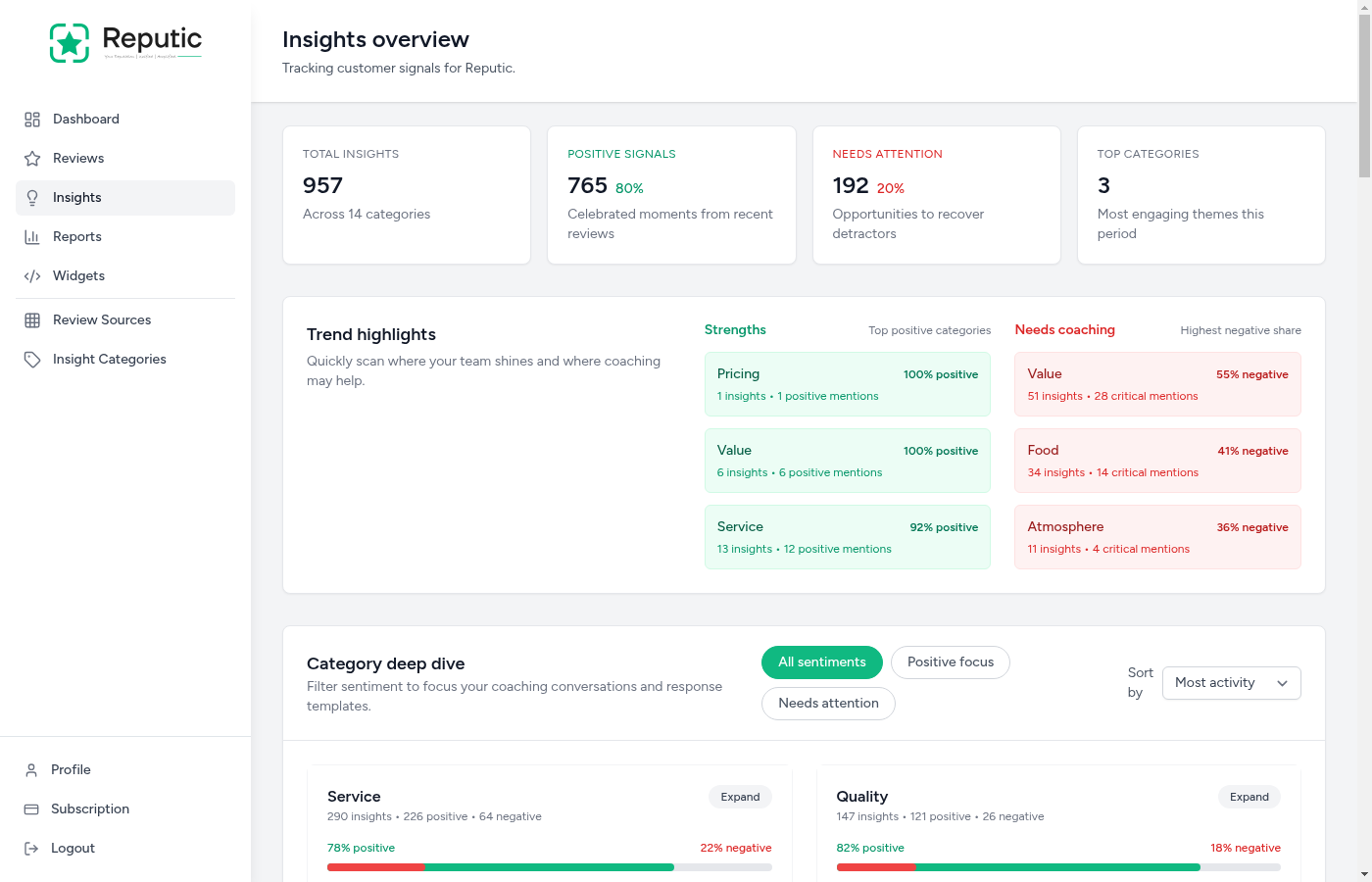
Navigate to Insights in the sidebar to access your insights dashboard.
Summary Cards
At the top of the page, you'll see four summary cards:
- Total Insights: The total number of insights extracted from all reviews
- Positive Signals: Count of positive insights showing what's working well
- Needs Attention: Count of negative insights highlighting areas for improvement
- Top Categories: The categories with the most feedback
Trend Highlights
Below the summary, you'll see trend highlights showing:
- Top 3 Positive Categories: Where you're excelling
- Top 3 Negative Categories: Where you need to focus improvement efforts
Category Deep Dive
The main section shows all your insight categories in a grid. Each category card displays:
- Category Name: The topic (Service, Room, Food, etc.)
- Insight Count: How many insights fall into this category
- Sentiment Breakdown: A visual bar showing the split between positive and negative
- Percentage Labels: Exact percentages for positive and negative sentiment
Filtering Insights
Use the filter options to focus on specific insights:
Sentiment Filter
- All: Show insights with any sentiment
- Positive: Show only positive insights
- Negative: Show only negative insights
Sorting Options
- By Volume: Categories with the most insights first
- Positive Focus: Categories with the highest positive percentage first
- Needs Attention: Categories with the highest negative percentage first
Expanding Categories
Click on any category card to expand it and see individual insights within that category. Each insight shows:
- Sentiment Badge: Positive or Negative
- Review Score: The star rating of the source review
- Description: AI-generated summary of the insight
- Quote: The exact text from the review
- Link: Click to view the full source review
Reading Insights Effectively
For Positive Insights
Positive insights reveal what customers value most about your business. Use them to:
- Reinforce strengths: Keep doing what works
- Train staff: Share specific praise with your team
- Marketing: Use themes from positive feedback in your marketing materials
- Respond to reviews: Reference specific positives when thanking customers
For Negative Insights
Negative insights highlight opportunities for improvement. Use them to:
- Prioritize fixes: Focus on categories with the most negative feedback
- Identify patterns: Look for recurring issues across multiple reviews
- Track progress: Monitor if negative sentiment decreases after making changes
- Respond thoughtfully: Address specific concerns when replying to reviews
How AI Extracts Insights
Reputic's AI processes each review through several steps:
- Content Analysis: The AI reads the full review text
- Topic Identification: It identifies what aspects of your business are mentioned
- Sentiment Detection: It determines whether each mention is positive or negative
- Quote Extraction: It pulls the relevant text that supports each insight
- Categorization: It assigns insights to appropriate categories
This happens automatically for every new review, typically within minutes of import.
Tips
Pro Tip: Check the "Needs Attention" sort weekly to stay on top of emerging issues. A category that suddenly has more negative insights may indicate a new problem.
Pro Tip: Compare positive and negative percentages within categories. A category with 70% positive and 30% negative might need attention, even if most feedback is positive.
Pro Tip: Use insights to guide staff training. If "slow service" appears frequently, it's a clear signal to focus on speed improvements.
Pro Tip: Track insights over time. After making improvements, monitor whether negative insights in that category decrease in subsequent months.
Insights vs. Individual Reviews
While individual reviews give you specific customer stories, insights give you the big picture:
| Individual Reviews | Insights |
|---|---|
| One customer's experience | Patterns across all customers |
| Full context and story | Focused on specific topics |
| Time-consuming to analyze | Quick to scan and understand |
| Good for response writing | Good for strategic decisions |
Use both together: insights to identify what matters, then individual reviews to understand the details.
Need help? Contact Support
Related Articles
Dashboard Overview
Get a quick read on your reviews, sentiment, and insight trends from your Reputic dashboard.
Connecting Review Sources
Learn how to connect your review platforms to Reputic and start aggregating customer feedback from Google, TripAdvisor, Booking.com, and more.
Navigating Your Reviews
Learn how to browse, filter, and read customer reviews from all your connected platforms in one place.