
Connecting Review Sources
Reputic aggregates reviews from over 20 platforms into one unified dashboard. Connect your review sources to start monitoring your online reputation across all the places your customers leave feedback.
Prerequisites
- Active Reputic account with an active subscription or trial
- The URL of your business listing on each review platform
Supported Platforms
Reputic supports a wide range of review platforms:
Travel & Hospitality
- Google Maps
- TripAdvisor
- Booking.com
- Expedia
- Hotels.com
- Airbnb
- Vrbo
- Agoda
- OpenTable
Business Reviews
- Trustpilot
- Yelp
- Zomato
- G2
- Glassdoor
E-commerce
- Amazon Seller
Regional (Netherlands)
- Kiyoh
- Klantenvertellen.nl
- Reviewspot.nl
- Thuisbezorgd.nl
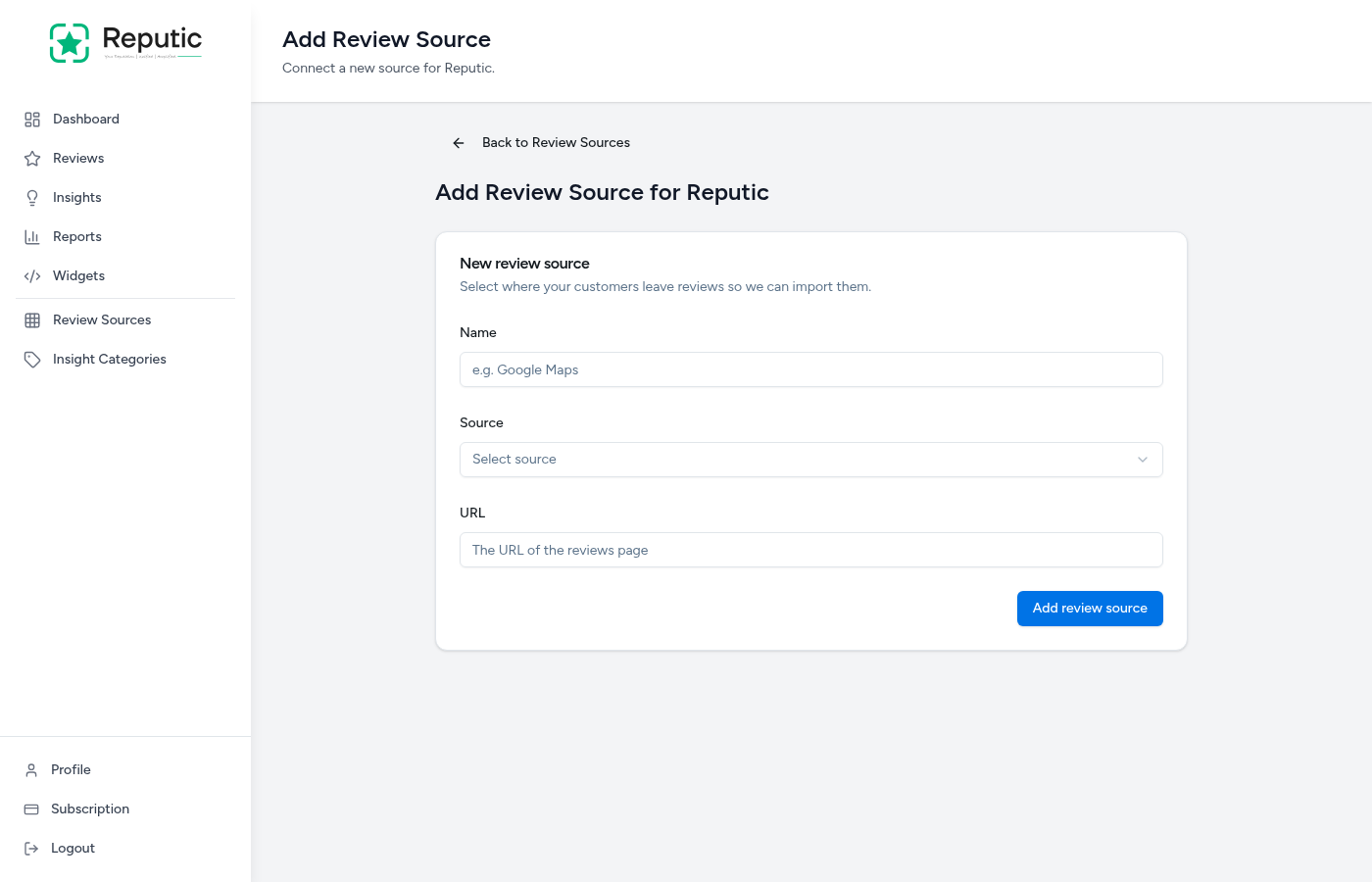
Adding a Review Source
- Navigate to Review Sources in the sidebar
- Click Add Review Source in the top right corner
- Enter a Name for this source (e.g., "Google Maps - Main Location")
- Select the Source Type from the dropdown menu
- Paste the URL of your business listing
- Click Save to add the source
Finding Your Business URL
Each platform has a different way to find your business listing URL:
Google Maps
- Search for your business on Google Maps
- Click on your business listing
- Copy the URL from your browser's address bar
- The URL should look like: 'https://www.google.com/maps/place/...'
TripAdvisor
- Go to tripadvisor.com and search for your business
- Click on your business listing
- Copy the URL from your browser's address bar
- The URL should look like: 'https://www.tripadvisor.com/Restaurant_Review-...' or 'https://www.tripadvisor.com/Hotel_Review-...'
Booking.com
- Go to booking.com and search for your property
- Click on your listing
- Copy the URL from your browser's address bar
- The URL should look like: 'https://www.booking.com/hotel/...'
Trustpilot
- Go to trustpilot.com and search for your business
- Click on your business profile
- Copy the URL from your browser's address bar
- The URL should look like: 'https://www.trustpilot.com/review/yourdomain.com'
Understanding Import Status
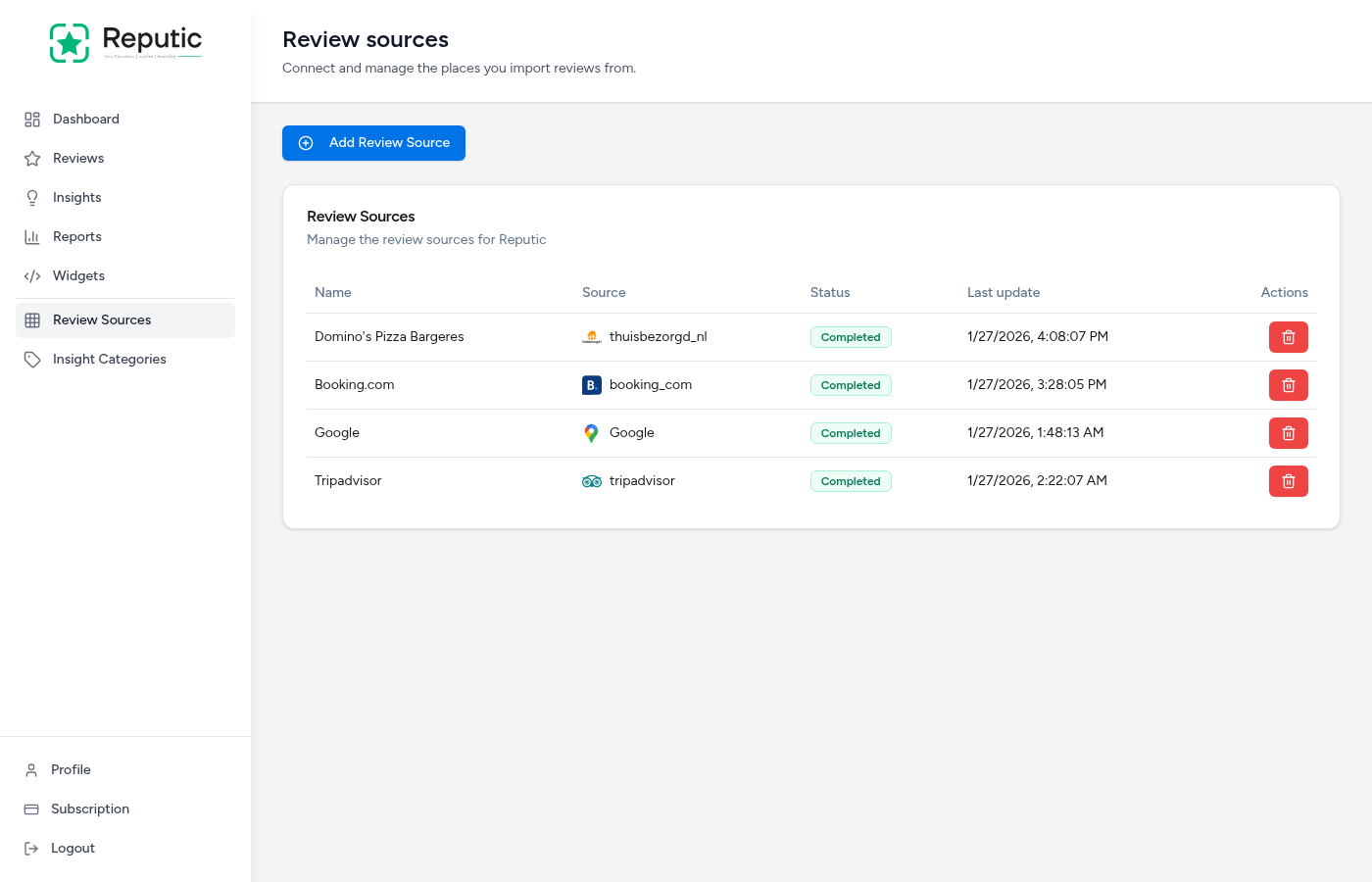
After adding a review source, you'll see a status indicator:
- Pending: The source has been added and is queued for processing
- Importing: Reviews are currently being fetched from the platform
- Completed: All reviews have been successfully imported
- Failed: There was an issue importing reviews (check that your URL is correct)
Initial imports may take a few minutes depending on the number of reviews. Subsequent syncs happen automatically to keep your reviews up to date.
Managing Review Sources
From the Review Sources page, you can:
- View status: See the current import status of each source
- Edit: Update the name or URL of a source
- Delete: Remove a source and its associated reviews
- Refresh: Manually trigger a new import
Tips
Pro Tip: Add all the platforms where your customers leave reviews to get a complete picture of your online reputation. Missing even one platform means missing valuable feedback.
Pro Tip: Use descriptive names for your sources if you have multiple locations. For example, "Google Maps - Amsterdam" and "Google Maps - Rotterdam" help you identify reviews by location.
Troubleshooting
Import stuck on "Pending"?
- Check that your subscription is active
- Verify the URL is correct and publicly accessible
- Try removing and re-adding the source
Import failed?
- Double-check that you copied the full URL
- Ensure your business listing is publicly visible
- Some platforms may have temporary access restrictions
Need help? Contact Support
Related Articles
Dashboard Overview
Get a quick read on your reviews, sentiment, and insight trends from your Reputic dashboard.
Navigating Your Reviews
Learn how to browse, filter, and read customer reviews from all your connected platforms in one place.
Managing Insight Categories
Learn how to organize and customize insight categories to better understand what matters most to your customers.